Entra Goat Scenario 1

I got some time to sit down and pick up from the last entry in the series where we had just finished setting up Scenario 1 of Entra Goat. We were left with a compromised user account and given the goal to login as the Global Admin and grab their flag. Let's jump in to how I approached this.
It goes without saying but anything shown in this post is purely for educational purposes and is written as an education piece.
Basic enumeration
The first thing I tried was to simply sign in as the user, run through the initial user setup and get the account up and running, this was achieved by simply signing in to https://office.com as the user, using the credentials provided by the scenario. Again, we're assuming that the user is compromised so when prompted I setup the MFA etc. In this scenario we are not focused on the initial access, but the elevation techniques.
With that out the way I wanted to see what the user could view from Entra. After heading to Entra via the gui I quickly realised that this was more reflective of the tenant settings and that I'd not got round to restricting view permissions for users rather than permissions of the user itself.
With this in mind I opted to then use the Az cli as I felt this gave more of locked down view of what the actual user might be able to view and see in a realistic environment.
Azure CLI
First to get signed in as our user. Simply running az login --allow-no-subscriptions and logging in as the user in the browser that opened.
At this stage, typically I'd like to enumerate items such as groups that my user is a part of, roles I have etc. However, in this instance we were given a major hint at the start of the scenario to take a look at entities that the user owned.
Object Ownership
Finding out objects we own via the Az cli is actually really nice, there's a built in command for it!
az ad signed-in-user list-owned-objects
Yup, it surprised me to! But there we are, this returned that we were the owners of an application and thus a Service Principal.
The pertinent information of the application which I took a note of:
- DisplayName = "Finance Analytics Dashboard"
- App ID/Service Principal ID = "fa7d5d65-af35-418a-a738-458fb8066e3f"
- Object ID = "6fb64a67-b523-4af5-aeb1-ca85a2508d43"
- The Tenant ID
Service Principals
Service principals are always of particular interest to malicious actors as they are not capable of completing mutli-factor authentication, as a result they can often bypass the identity based protection that is put in place by administrators.
It's also significant to note that owners of service principals are able to manage their related credentials. This may allow owners to sign in as the service principal, this can be compounded if these are assigned directory roles or permissions.
Escalation
At this point, we've signed in as the compromised user and identified that we have ownership of a service principal.
I'll hold my hands up, at this stage I should've looked to see and confirm what roles were assigned to the service principal, but I didn't. I auto-piloted a bit here and only checked role assignments after the fact. The service principal in this instance had the role of 'Privileged Authentication Administrator'.
This role is highly privileged as it allows the role holder the ability to manage any of the authentication methods of privileged users within the tenant, including Global Admins.
Resetting the SP credentials
We've identified the probably path in, now it's time to escalate our privileges. Firstly, as the victim user we needed to reset the credentials of the service princiapl. Using the az cli again:
az ad sp credential reset --id fa7d5d65-af35-418a-a738-458fb8066e3f
This command reset the credential of the sp and returned a new password for the service principal, perfect.
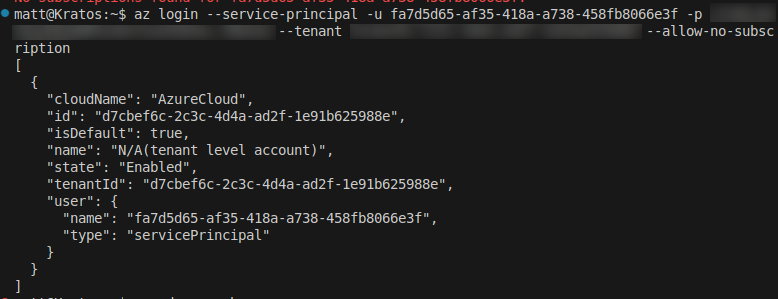
We can then sign in to the az cli as the service principal:
az login --service-principal -u fa7d5d65-af35-418a-a738-458fb8066e3f -p Insert_password_from_above --tenant tenant_ID
This logged me in as the service principal.
Resetting our target
First I had to identify the target user's ID prior to reseting any authentication methods. I knew I didn't have many users in the tenant so I simply dumped the entire list with az ad user list and made a note of the ID of the Entra S1 admin user which was: 73bf8018-44ee-4387-868d-3bfc0b7e5922
I then reset the password of the account with the following:
az ad user update --id 73bf8018-44ee-4387-868d-3bfc0b7e5922 --password Sup3rS3cur3Goat123!
The password you set here can be whatever you like within reason.
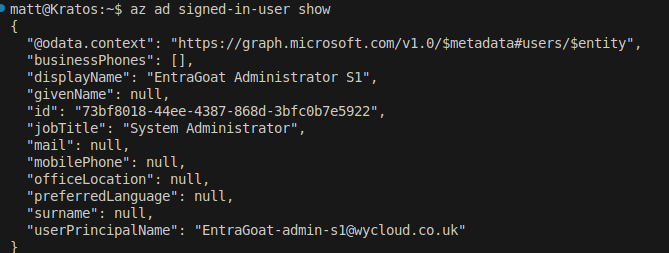
Attempting a sign in as this user, utilising the username and password we just set, logging in via az login --allow-no-subscriptions (either this or the portal would work at this stage)
And voila!
Flag grabbing
The final step was to grab the flag, this could either be done via the portal > navigate to the user and then expand the extensions within the properties. (Technically this can be done at any stage)
Or alternatively, via the Microsoft Graph, I did steal the Powershell for this one from Semperis, however, this is more just a proof perspective as it shows that the Entra S1 admin user is signed in via the 'me' claim in the URI.

Defending
When it comes to stopping this attack vector, this all comes down to misconfigured application Ownership and applications with overly permissive directory roles assigned. The following recommendations spring to mind:
- Audit your Enterprise Applications, Application registrations and service principals regularly.
- Audit assigned directory roles and permissions, ensuring that only the right roles are assigned.
- Understand where Service Principals are used in your enviornment and their identity model to understand the attack landscape they introduce.
Summary
Thanks for sticking it out this far! This was a fun one, it goes without mentioned, but big thanks to the Semperis team for providing EntraGoat as a great resource!